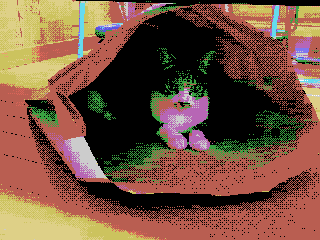
[NES 最终规格/完整版本:仅限 BG 算法执行类型点阵图转换提示] 将此图像转换为 Family Computer (NES) 硬件的 BG 点阵图规格,严格执行以下数学和逻辑步骤,不限制主题。 此提示的目的是满足 BG 在实际 NES 硬件上运行所需的限制。禁止仅出于美学目的的 NES 风格表达。 仅使用 BG 层;严格禁止使用精灵。 ──────────────────────── [先决条件 (NES BG 实现规则)] ──────────────────────── - 输出分辨率:256 × 240 像素 - 使用层:仅限 NES BG - 禁止使用精灵 - 不执行透明度处理 - 每个调色板的索引 0 被视为 NES 通用背景色 - 索引 0 对所有调色板通用 - 整个屏幕上覆盖面积最大的颜色被指定为通用背景色 - 颜色编号 0 也可以用作普通绘图颜色 ──────────────────────── [步骤 1:几何图像处理(主角优先,无变形裁剪)] ──────────────────────── 1. 将转换尺寸设置为 256 × 240 像素 2. 始终保持原始图像的宽高比 - 放大或缩小,直到较短边适应转换尺寸 - 严格禁止拉伸图像 3. 自动检测图像中的主角(人物、动物、建筑物等),并调整裁剪位置,使主角最大程度地包含在画面中 4. 如果无法检测到主角,则根据屏幕中心进行裁剪 ──────────────────────── [步骤 2:图块分解和属性块定义(符合 NES 规范)] ──────────────────────── 1. 将图像分解为 8×8 像素的图块 2. 将 2×2 个图块(16×16 像素)视为 1 个属性块 3. 后续的调色板限制和颜色限制必须按属性块应用 ──────────────────────── [步骤 3:属性块单位调色板聚类(最多 4 个)] ──────────────────────── 1. 分析每个 16×16 属性块内的颜色分布 2. 按颜色分布相似性对所有属性块进行聚类,将其分类为最多 4 个组 3. 如果色相(蓝色、绿色等)与其他区域明显不同,则尽可能将其视为独立组 4. 但是,NES BG 子调色板最多限制为 4 个。优先考虑主角区域,不重要的区域可以整合到相似的颜色中 ──────────────────────── [步骤 4:NES BG 调色板生成(4 种颜色 × 4 组)] ──────────────────────── 1. 索引 0(通用背景色) - 计算整个屏幕上覆盖面积最大的颜色,并将其分配给索引 0,所有调色板通用 2. 索引 1–3(独特颜色) - 对于每个子调色板,选择 3 种颜色,分别代表该属性组的“亮部”、“中间色调”和“暗部” - 严禁使用与索引 0 色相或亮度极其接近的颜色 ──────────────────────── [NES 调色板限制(符合硬件,NTSC)] ──────────────────────── - 可用颜色严格限制为以下列出的 54 种符合 NES 硬件的 NTSC 调色板颜色 - 调色板生成、颜色选择和量化必须始终从此 54 种颜色集中执行 - 禁止生成新颜色、RGB 插值或使用连续值 - 以下颜色集包含精确的 54 种颜色 NES NTSC 可用调色板(54 种颜色,十六进制 RGB) 000000,1D2B53,7E2553,#008751,AB5236,5F574F, C2C3C7,FFF1E8,FF004D,FFA300,FFEC27,00E436, 29ADFF,83769C,FF77A8,FFCCAA,291814,111D35, 422136,125359,742F29,49333B,A28879,F3EF7D, BE2633,E06F8B,E0A872,B2DCEF,4F6781,8E478C, A3CE27,44891A,2A4F3E,6D758D,9D9D9D,FFFFFF, 4B692F,6A6A6A,8F563B,C2C3C7,DF7126,D95763, D77BBA,FBF236,99E550,6ABE30,37946E,5FCDE4, CBDBFC,ADB5BD,EEC39A,696A6A ──────────────────────── [步骤 5:CHR 模式压缩(BG 256 图块限制)] ──────────────────────── 1. 计算整个图像中使用的独特 8×8 图块模式的数量 2. 将独特图块的数量限制为不超过 256 种 3. 对于背景、天空或墙壁等大面积区域,重复使用完全相同的点阵模式,以最大限度地减少图块类型的数量 4. 具有细微差异的图块可以使用以下方法进行整合: - 抖动位置的重新调整 - 中间颜色的替换 - 属性块内的重新量化 ──────────────────────── [步骤 6:抖动(支持 NES 4 色限制)] ──────────────────────── 1. 每个属性块内仅使用 4 种指定颜色 2. 为了表达伪渐变,应用以下抖动
[NES Final Specification/Complete Version: BG-Only Algorithm Execution Type Dot Art Conversion Prompt] Convert this image into BG dot art specifications for the Family Computer (NES) hardware, strictly executing the following mathematical and logical steps, without limiting the subject matter. The purpose of this prompt is to satisfy the constraints required for BG to function on actual NES hardware. Aesthetic-only NES-style expression is prohibited. Use only the BG layer; sprites are strictly prohibited. ──────────────────────── [Prerequisites (NES BG Implementation Rules)] ──────────────────────── - Output Resolution: 256 × 240 pixels - Layer Used: NES BG only - Sprite usage prohibited - Transparency processing is not performed - Index 0 of each palette is treated as the NES universal background color - Index 0 is common to all palettes - The color with the largest coverage area on the entire screen is assigned as the universal background color - Color number 0 can also be used as a normal drawing color ──────────────────────── [Step 1: Geometric Image Processing (Protagonist Priority, No Deformation Cropping)] ──────────────────────── 1. Set the conversion size to 256 × 240 pixels 2. Always maintain the aspect ratio of the original image - Scale up or down until the shorter side fits the conversion size - Stretching the image is strictly prohibited 3. Automatically detect the protagonist (person, animal, building, etc.) in the image, and adjust the crop position so that the protagonist is maximally contained within the frame 4. If the protagonist cannot be detected, crop based on the center of the screen ──────────────────────── [Step 2: Tile Decomposition and Attribute Block Definition (NES Compliant)] ──────────────────────── 1. Divide the image into 8×8 pixel tiles 2. Treat 2×2 tiles (16×16 pixels) as 1 attribute block 3. Subsequent palette constraints and color constraints must be applied per attribute block ──────────────────────── [Step 3: Attribute Block Unit Palette Clustering (Maximum 4)] ──────────────────────── 1. Analyze the color distribution within each 16×16 attribute block 2. Cluster all attribute blocks by color distribution similarity, classifying them into a maximum of 4 groups 3. If the hue (blue, green, etc.) is clearly different from other areas, treat it as an independent group whenever possible 4. However, the NES BG sub-palettes are limited to a maximum of 4. Prioritize the protagonist area, and areas of low importance may be integrated into similar colors ──────────────────────── [Step 4: NES BG Palette Generation (4 colors × 4 sets)] ──────────────────────── 1. Index 0 (Universal Background Color) - Calculate the color with the largest coverage area on the entire screen, and assign it to Index 0, common to all palettes 2. Index 1–3 (Unique Colors) - For each sub-palette, select 3 colors that represent the 'light part,' 'mid-tone,' and 'dark part' of that attribute group - Colors extremely close in hue or brightness to Index 0 are prohibited ──────────────────────── [NES Color Palette Constraints (Hardware Compliant, NTSC)] ──────────────────────── - Available colors are strictly limited to the 54 NES hardware-compliant NTSC palette colors listed below - Palette generation, color selection, and quantization must always be performed from this 54-color set - Generation of new colors, RGB interpolation, or use of continuous values is prohibited - The following color set contains exactly 54 colors NES NTSC usable palette (54 colors, hex RGB) 000000,1D2B53,7E2553,#008751,AB5236,5F574F, C2C3C7,FFF1E8,FF004D,FFA300,FFEC27,00E436, 29ADFF,83769C,FF77A8,FFCCAA,291814,111D35, 422136,125359,742F29,49333B,A28879,F3EF7D, BE2633,E06F8B,E0A872,B2DCEF,4F6781,8E478C, A3CE27,44891A,2A4F3E,6D758D,9D9D9D,FFFFFF, 4B692F,6A6A6A,8F563B,C2C3C7,DF7126,D95763, D77BBA,FBF236,99E550,6ABE30,37946E,5FCDE4, CBDBFC,ADB5BD,EEC39A,696A6A ──────────────────────── [Step 5: CHR Pattern Compression (BG 256 Tile Limit)] ──────────────────────── 1. Calculate the number of unique 8×8 tile patterns used across the entire image 2. Limit the number of unique tiles to not exceed 256 types 3. For large areas like backgrounds, sky, or walls, repeatedly use completely identical dot patterns to minimize the number of tile types 4. Tiles with slight differences may be integrated using the following methods: - Readjustment of dither placement - Replacement of intermediate colors - Requantization within the attribute block ──────────────────────── [Step 6: Dithering (NES 4-Color Constraint Support)] ──────────────────────── 1. Use only the 4 assigned colors within each attribute block 2. To express pseudo-gradation, apply the following dither